Every time a customer sends a message outside business hours and receives no reply, they face a frustrating experience that can drive them straight to a competitor. In a business environment where WhatsApp and Telegram have become fundamental customer service channels, leaving messages unanswered for hours — or even days — is not a viable option. The Auto Reply Schedule module for Odoo 18 solves exactly this problem: it automates out-of-hours replies on Odoo Discuss messaging channels, ensuring no customer goes without an immediate response, even when your team has already finished their working day.
The problem of out-of-hours customer service in Odoo
Companies that have integrated WhatsApp or Telegram into their customer service workflow know the dilemma well: customers send messages when they have questions, and that does not respect office hours. A customer who writes at 10 o'clock at night asking about the status of their order, or a potential buyer who wants to confirm product availability before purchasing, expects at least a signal that they have been heard. Without an automatic reply, that silence becomes uncertainty, and uncertainty becomes abandonment.
The problem is compounded when the company manages multiple communication channels from Odoo Discuss. Without an odoo whatsapp auto reply solution, the customer service team arrives each morning to an inbox full of accumulated messages, with no way of knowing which are urgent and which have already lapsed because the customer found an alternative. Every unanswered message is a lost business opportunity that, in most cases, does not even appear in any report. It simply disappears.
How the Auto Reply Schedule module works
The Auto Reply Schedule module intercepts incoming messages on WhatsApp and Telegram channels within Odoo Discuss and, if the message arrives outside the configured schedule, automatically sends a predefined reply to the contact. All of this happens without human intervention and in real time, so the customer immediately receives confirmation that their message has arrived and that the team will attend to them during business hours.
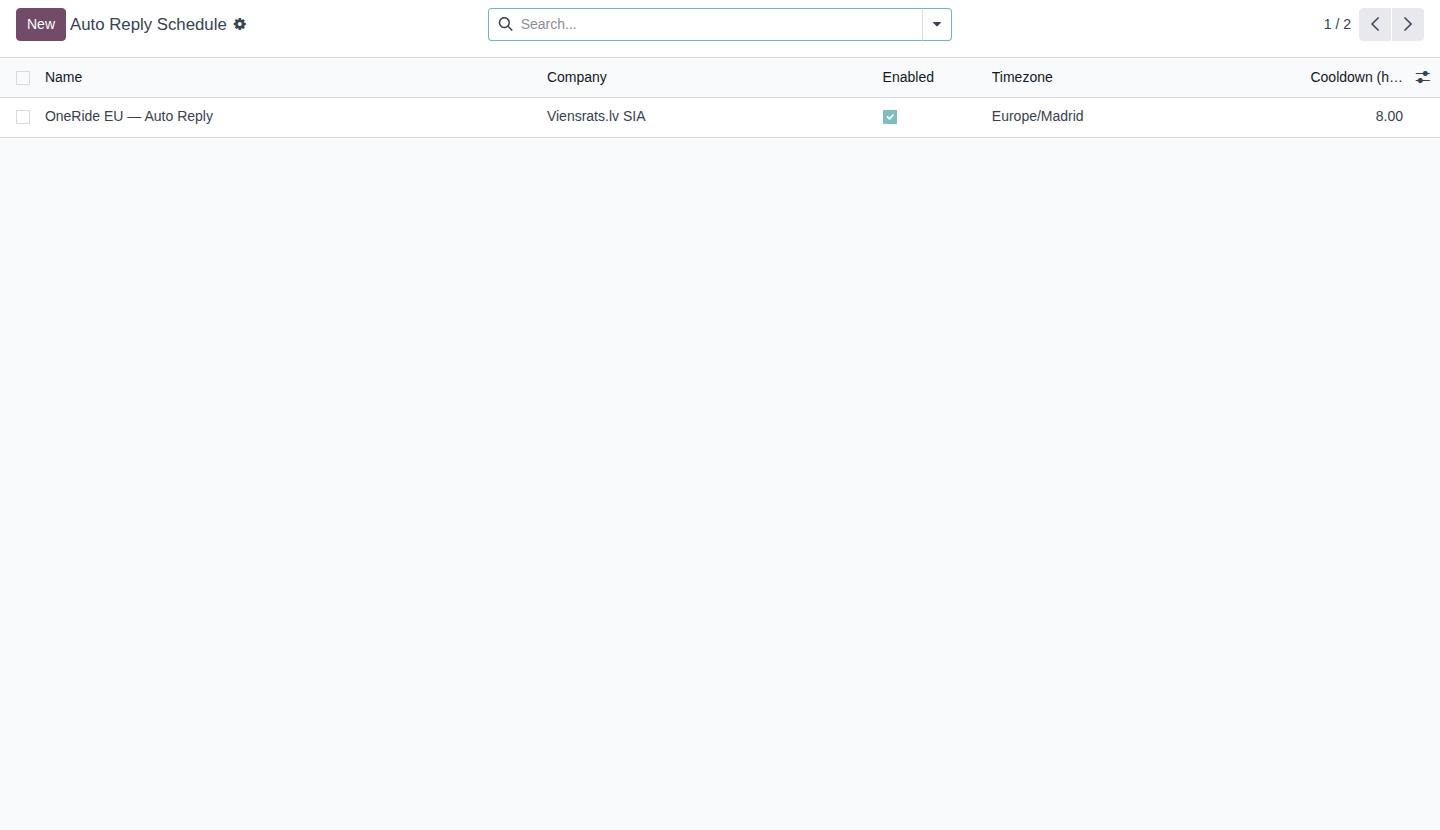
The internal workings are based on two main models: auto.reply.schedule, which defines the general schedule configuration and messages, and auto.reply.schedule.line, which allows independent hour ranges to be specified for each day of the week. When a message arrives on a compatible channel, the system checks the active schedule for the corresponding company, verifies whether the current time falls within the configured business hours and, if it does not, triggers the automatic reply. The entire process takes into account the time zone configured in Odoo, so it works correctly in environments with geographically distributed teams.
Key features of the Auto Reply Schedule module
One of the most valued features of the module is the ability to configure specific schedules per company and per day of the week. This means that if your company has different hours on Mondays than on Saturdays — or if it simply does not operate on Sundays — you can reflect that exactly in the configuration. This is not a simple global time slot: it is a granular system that allows the automation to be adapted to the operational reality of each business, however complex it may be.
The module also includes bilingual messages in Spanish and English, which is especially useful for companies operating in international markets or serving customers of different origins. It also incorporates an intelligent cooldown function that prevents the same contact from receiving multiple automatic replies within a short period of time, thus avoiding the spam effect that could damage the user experience. This function is essential when customers send several messages in a row outside business hours: the system replies once and does not do so again until the configured cooldown period has elapsed.
Installation and configuration of the Auto Reply Schedule module
Installation of the module is completely standard within the Odoo ecosystem. Go to Applications in the Odoo main menu, search for "Auto Reply Schedule" in the app store and click install. The module has only one mandatory dependency: mail, which is already included in any base installation of Odoo 18. If you also want to activate the functionality for WhatsApp, you will need to have the whatsapp module installed; for Telegram, the telegram_integration module. Both are optional dependencies, so the module will work without them if you only need part of the functionality.
Once installed, you will find the configuration in the Configuration → Automatic Replies menu within Odoo Discuss. From there you can create your first schedule by clicking "New" and filling in the form: schedule name, the company it applies to, time zone, and the hour ranges for each day of the week using the auto.reply.schedule.line lines. On the same screen you will configure the message to be sent outside business hours, with the option to add an English version for international contacts. The cooldown period is also configured here, specifying how many minutes must pass before the system sends another automatic reply to the same contact.
Technical details of the Auto Reply Schedule module
For technical teams that need to assess the module's compatibility with their Odoo installation, here are the relevant details. The module is published under the LGPL-3 license, which means it is completely free and open source. It is designed specifically for Odoo 18.0 and requires no special server configuration beyond having the corresponding messaging modules active.
The models created by the module are auto.reply.schedule for the main schedule configuration and auto.reply.schedule.line for the schedule lines per day. These models integrate natively with the Odoo Discuss messaging system and do not interfere with other installed modules. The architecture is lightweight enough not to add significant load to the server, even in installations with high message volumes.
| Parameter | Value |
|---|---|
| Odoo Version | 18.0 |
| License | LGPL-3 |
| Mandatory Dependencies | |
| Optional Dependencies | whatsapp, telegram_integration |
| Models | auto.reply.schedule, auto.reply.schedule.line |
| Category | Communication |
| Cost | Free |
Frequently asked questions
whatsapp module to be installed in order to work with WhatsApp channels. That module is part of Odoo's standard offering and its requirements depend on the Odoo plan you have contracted. For Telegram integration, on the other hand, the optional dependency is telegram_integration, which is the open-source module from Accelero.ai available free of charge.
auto.reply.schedule.line model, you can configure independent hour ranges for each day of the week. If on Mondays your hours are 9:00 to 19:00 but on Fridays you close at 15:00, you can reflect that exactly in the system. Days on which you have no activity — such as Sunday — can be left without a schedule line, so the module will consider them entirely outside business hours and will send the automatic reply throughout the entire day.
mail, which is the core of the Odoo messaging system, but the automatic reply functionality is oriented towards external messaging channels (WhatsApp and Telegram). It is not designed to automatically reply to emails or to internal Odoo messages, as those use cases have their own native tools on the platform.
Download Auto Reply Schedule
Free on the Odoo Apps Store. Install in minutes and start serving your customers even when your team is not available. No licence cost, no complex configuration.
Download on Odoo Apps Store →Do you need a custom automation for your customer service workflow? Let's talk